<?xml version="1.0" encoding="utf-8"?><feed xmlns="http://www.w3.org/2005/Atom" ><generator uri="https://jekyllrb.com/" version="3.10.0">Jekyll</generator><link href="/feed.xml" rel="self" type="application/atom+xml" /><link href="/" rel="alternate" type="text/html" /><updated>2026-06-20T08:39:10+00:00</updated><id>/feed.xml</id><title type="html">Luka Bratos</title><subtitle>Personal website and blog of Luka Bratos</subtitle><entry><title type="html">Removing UTM parameters with Apple’s Shortcuts</title><link href="/2020/05/08/removing-utm-parameters-with-apples-shortcuts/" rel="alternate" type="text/html" title="Removing UTM parameters with Apple’s Shortcuts" /><published>2020-05-08T14:40:00+00:00</published><updated>2020-05-08T14:40:00+00:00</updated><id>/2020/05/08/removing-utm-parameters-with-apples-shortcuts</id><content type="html" xml:base="/2020/05/08/removing-utm-parameters-with-apples-shortcuts/"><![CDATA[<p>Here’s the thing. You’re browsing on the internet and find an interesting website that you want to share with a friend.</p>

<p>You tap on a share button and copy the website’s URL. Suddenly you realize that the URL contains pesky UTM parameters.</p>

<blockquote>
  <p>Urchin Tracking Module (UTM) parameters are five variants of URL parameters used by marketers to track the effectiveness of online marketing campaigns across traffic sources and publishing media.<sup id="fnref:1" role="doc-noteref"><a href="#fn:1" class="footnote" rel="footnote">1</a></sup></p>
</blockquote>

<p>As a self-respecting friend you’re – you quickly remove those from the end of the URL before you share it with your friend.</p>

<h2 id="ios-shortcuts">iOS Shortcuts</h2>

<p>I knew about the app<sup id="fnref:2" role="doc-noteref"><a href="#fn:2" class="footnote" rel="footnote">2</a></sup> for a while, from the times when it was called Workflow<sup id="fnref:3" role="doc-noteref"><a href="#fn:3" class="footnote" rel="footnote">3</a></sup> but I never gave it a proper chance until today. While I was browsing through the gallery of all the available shortcuts I came up with an idea …</p>

<h2 id="automate-all-the-things">Automate all the things</h2>

<p>There’s a large set of actions supported in Shortcuts. The big deal however is the ability to <a href="https://support.apple.com/en-gb/guide/shortcuts/apd218e2187d/ios">run</a> JavaScript on a web page.</p>

<p>Since the URL polluted with UTM parameters looks like this:</p>

<p>https://www.example.com/page?<mark>utm_content=buffercf3b2&amp;utm_medium=social&amp;utm_source=facebook.com&amp;utm_campaign=buffer</mark></p>

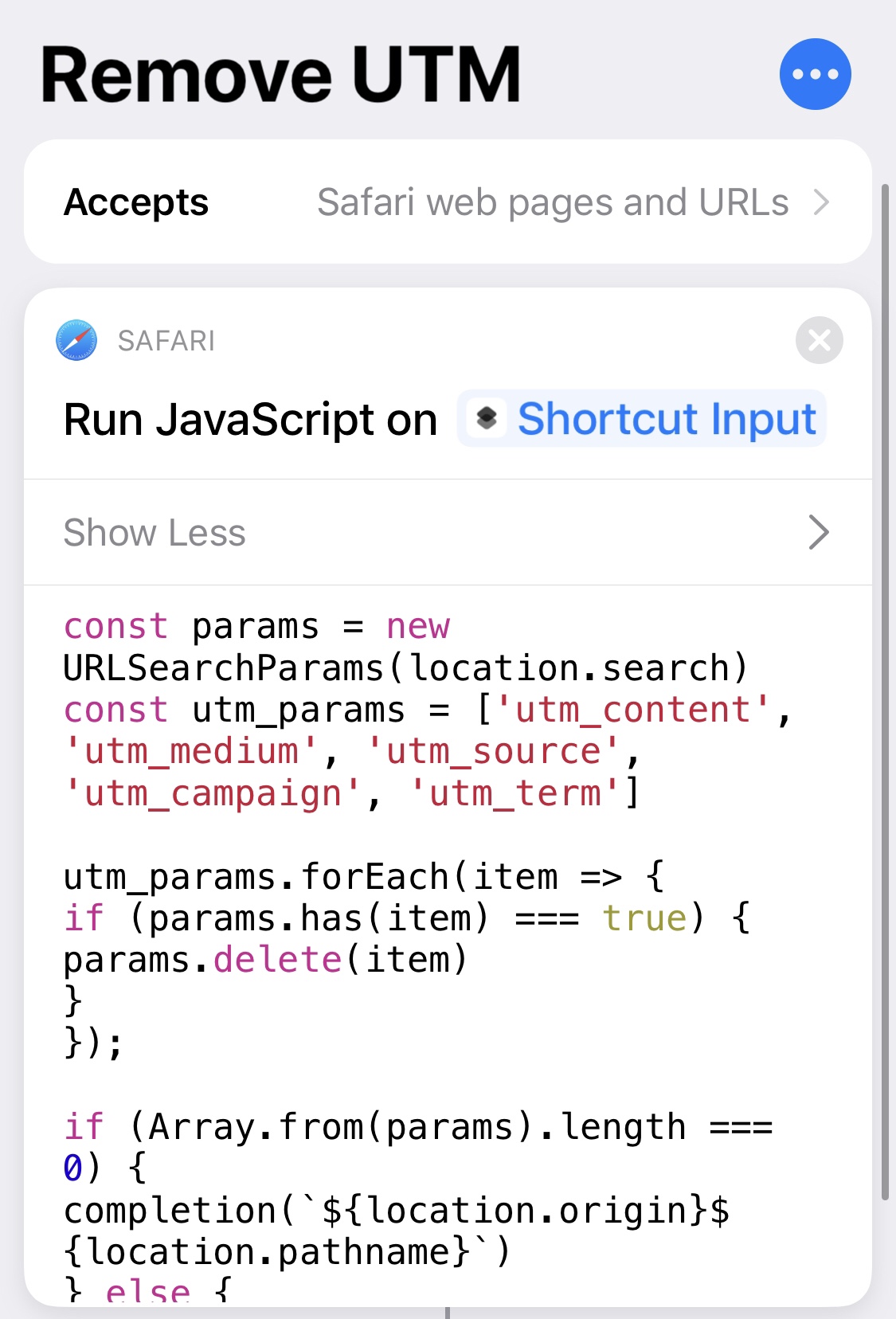
<p>I came up with a solution in JavaScript that would remove all the query parameters associated with the UTM from the URL:</p>

<div class="language-javascript highlighter-rouge"><div class="highlight"><pre class="highlight"><code><span class="kd">const</span> <span class="nx">params</span> <span class="o">=</span> <span class="k">new</span> <span class="nx">URLSearchParams</span><span class="p">(</span><span class="nx">location</span><span class="p">.</span><span class="nx">search</span><span class="p">)</span>
<span class="kd">const</span> <span class="nx">utm_params</span> <span class="o">=</span> <span class="p">[</span><span class="dl">'</span><span class="s1">utm_content</span><span class="dl">'</span><span class="p">,</span> <span class="dl">'</span><span class="s1">utm_medium</span><span class="dl">'</span><span class="p">,</span> <span class="dl">'</span><span class="s1">utm_source</span><span class="dl">'</span><span class="p">,</span> <span class="dl">'</span><span class="s1">utm_campaign</span><span class="dl">'</span><span class="p">,</span> <span class="dl">'</span><span class="s1">utm_term</span><span class="dl">'</span><span class="p">]</span>

<span class="nx">utm_params</span><span class="p">.</span><span class="nx">forEach</span><span class="p">(</span><span class="nx">item</span> <span class="o">=&gt;</span> <span class="p">{</span>
	<span class="k">if</span> <span class="p">(</span><span class="nx">params</span><span class="p">.</span><span class="nx">has</span><span class="p">(</span><span class="nx">item</span><span class="p">)</span> <span class="o">===</span> <span class="kc">true</span><span class="p">)</span> <span class="p">{</span>
		<span class="nx">params</span><span class="p">.</span><span class="k">delete</span><span class="p">(</span><span class="nx">item</span><span class="p">)</span>
	<span class="p">}</span>
<span class="p">});</span>

<span class="k">if</span> <span class="p">(</span><span class="nb">Array</span><span class="p">.</span><span class="k">from</span><span class="p">(</span><span class="nx">params</span><span class="p">).</span><span class="nx">length</span> <span class="o">===</span> <span class="mi">0</span><span class="p">)</span> <span class="p">{</span>
	<span class="nx">completion</span><span class="p">(</span><span class="s2">`</span><span class="p">${</span><span class="nx">location</span><span class="p">.</span><span class="nx">origin</span><span class="p">}${</span><span class="nx">location</span><span class="p">.</span><span class="nx">pathname</span><span class="p">}</span><span class="s2">`</span><span class="p">)</span>
<span class="p">}</span> <span class="k">else</span> <span class="p">{</span>
	<span class="nx">completion</span><span class="p">(</span><span class="s2">`</span><span class="p">${</span><span class="nx">location</span><span class="p">.</span><span class="nx">origin</span><span class="p">}${</span><span class="nx">location</span><span class="p">.</span><span class="nx">pathname</span><span class="p">}</span><span class="s2">?</span><span class="p">${</span><span class="nx">params</span><span class="p">}</span><span class="s2">`</span><span class="p">)</span>
<span class="p">}</span>
</code></pre></div></div>

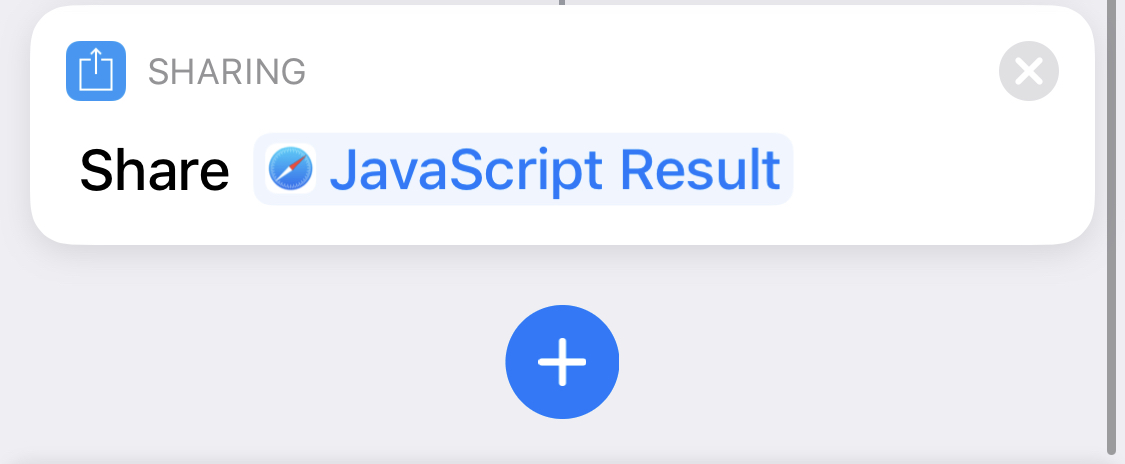
<p>Complete shortcut:</p>

<table>
  <thead>
    <tr>
      <th style="text-align: center">Part 1</th>
      <th style="text-align: center">Part 2</th>
    </tr>
  </thead>
  <tbody>
    <tr>
      <td style="text-align: center"><img src="/images/Shortcuts1.jpg" alt="Shortcuts1" /></td>
      <td style="text-align: center"><img src="/images/Shortcuts2.jpg" alt="Shortcuts2" /></td>
    </tr>
  </tbody>
</table>

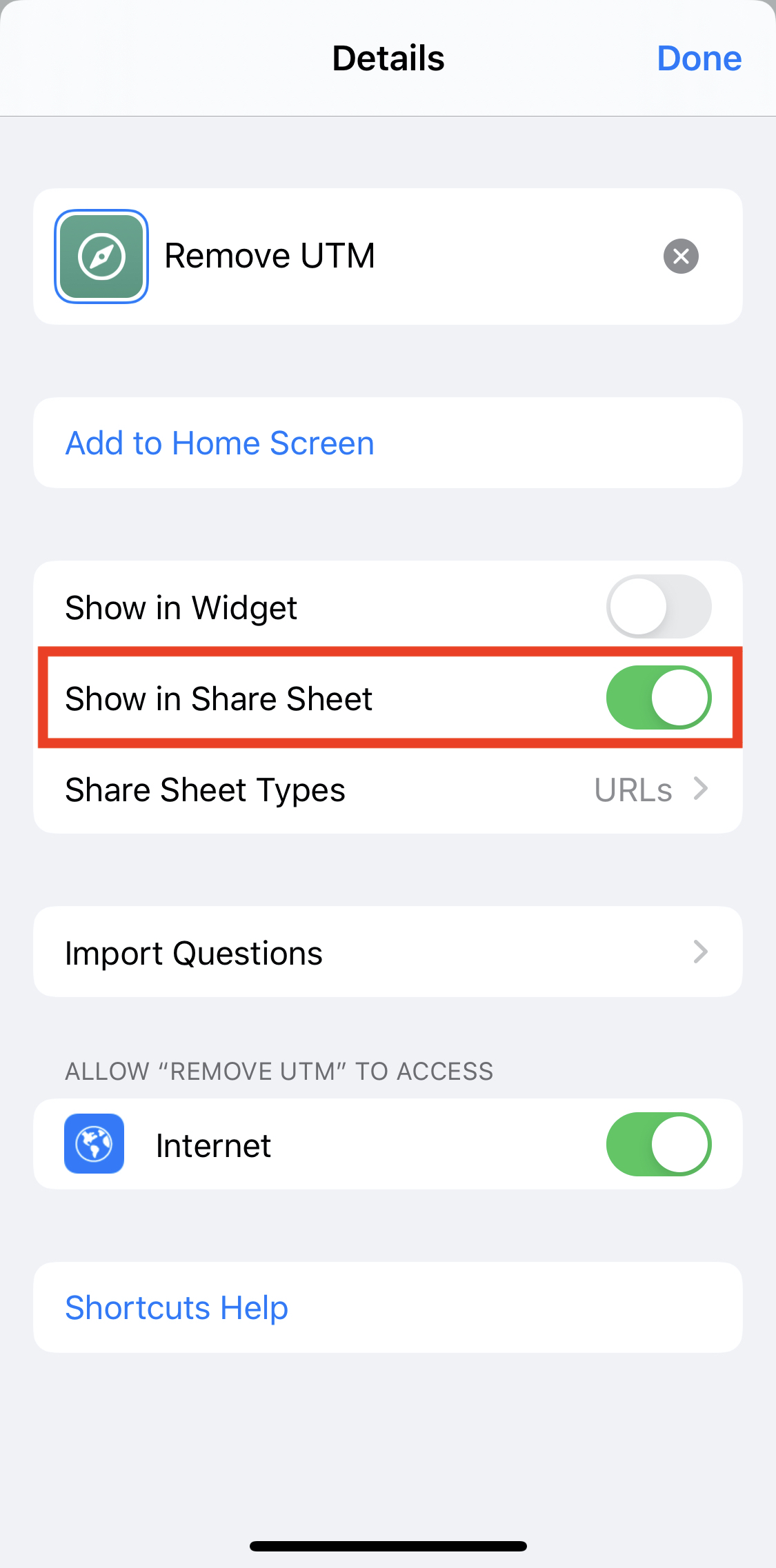
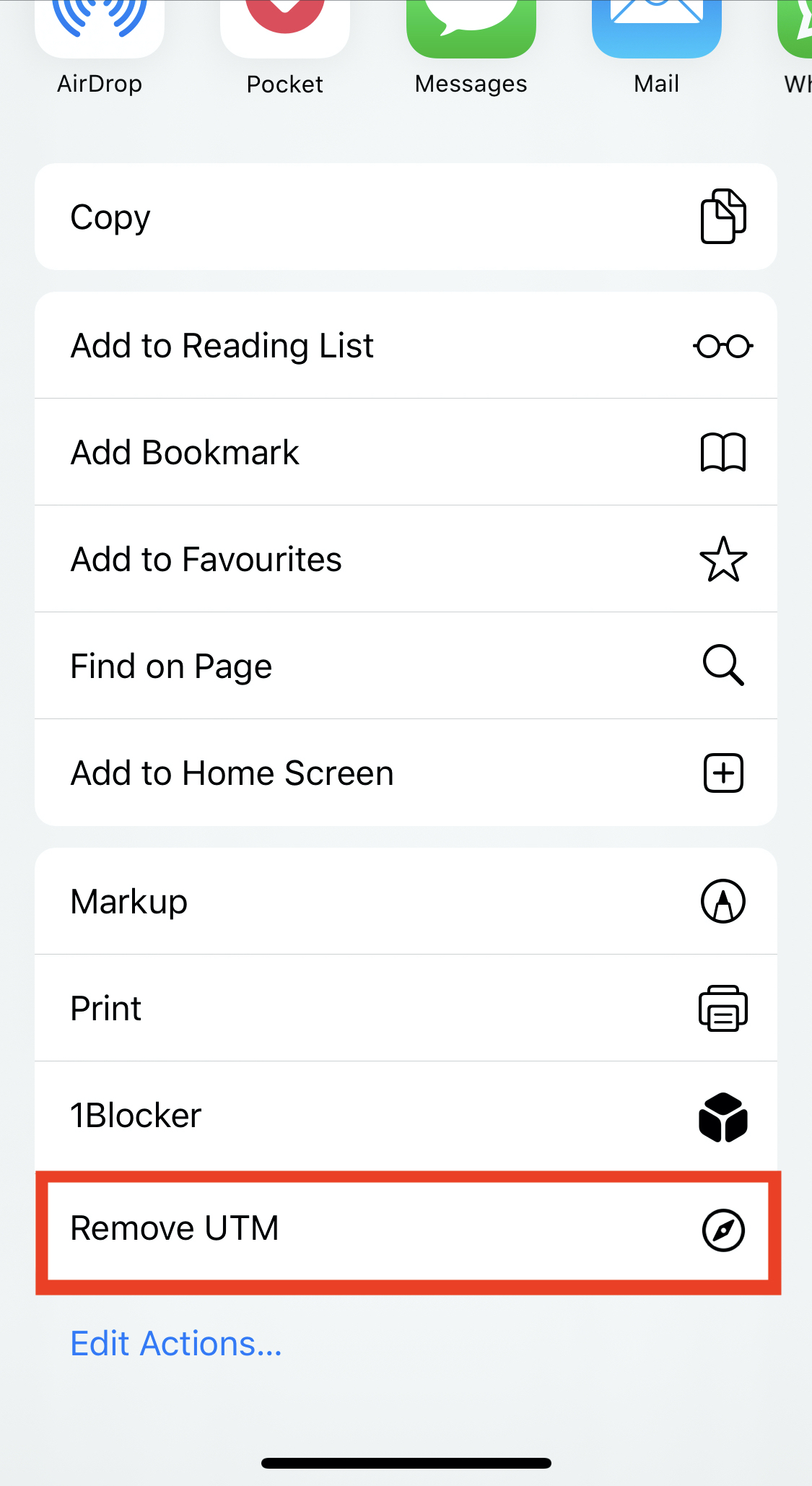
<p>As a last step, I’ve enabled the shortcut in the Share Sheet so it’s easily accessible:</p>

<table>
  <tbody>
    <tr>
      <td><img src="/images/Shortcuts3.jpg" alt="Shortcuts1" /></td>
      <td><img src="/images/Shortcuts4.jpg" alt="Shortcuts2" /></td>
    </tr>
  </tbody>
</table>

<h2 id="sorry-marketers">Sorry marketers</h2>

<p>Usage workflow is following:</p>

<ol>
  <li>You’re viewing web page in Safari</li>
  <li>Tap on share button</li>
  <li>Tap on <strong>Remove UTM</strong> button</li>
  <li>Copy or share the sanitised URL</li>
</ol>

<p>You can download the shortcut <a href="https://www.icloud.com/shortcuts/bbc6a213d8804e5d87b7f89674940f7f">here</a>. As a prerequisite you need to enable setting for <a href="https://support.apple.com/en-hk/HT210628">Untrusted Shortcuts</a>.</p>

<p>Do you use Shortcuts app? Which shortcuts are your favourite ones? Do you know any other tricks? Let me know on <a href="https://twitter.com/lukabratos/status/1258819152095195141">Twitter</a>!</p>

<div class="footnotes" role="doc-endnotes">
  <ol>
    <li id="fn:1" role="doc-endnote">
      <p><a href="https://en.wikipedia.org/wiki/UTM_parameters">Wikipedia</a> <a href="#fnref:1" class="reversefootnote" role="doc-backlink">&#8617;</a></p>
    </li>
    <li id="fn:2" role="doc-endnote">
      <p><a href="https://apps.apple.com/us/app/shortcuts/id915249334">Shortcuts</a> <a href="#fnref:2" class="reversefootnote" role="doc-backlink">&#8617;</a></p>
    </li>
    <li id="fn:3" role="doc-endnote">
      <p><a href="http://workflow.is/">Workflow</a> <a href="#fnref:3" class="reversefootnote" role="doc-backlink">&#8617;</a></p>
    </li>
  </ol>
</div>]]></content><author><name></name></author><summary type="html"><![CDATA[Using iOS Shortcuts app to remove UTM parameters from the URLs]]></summary></entry><entry><title type="html">How do I find all the modifications of a given string using git</title><link href="/2020/04/16/how-do-I-find-all-the-modifications-of-a-given-string-using-git/" rel="alternate" type="text/html" title="How do I find all the modifications of a given string using git" /><published>2020-04-16T18:40:54+00:00</published><updated>2020-04-16T18:40:54+00:00</updated><id>/2020/04/16/how-do-I-find-all-the-modifications-of-a-given-string-using-git</id><content type="html" xml:base="/2020/04/16/how-do-I-find-all-the-modifications-of-a-given-string-using-git/"><![CDATA[<p>A few days ago I was reviewing some code. While looking at one class, one of the global variables caught my attention. I wanted to understand why it was to that class and who wrote it.</p>

<p>The first thing I did was to run <code class="language-plaintext highlighter-rouge">git blame</code> command. It gave me the context about the last modification and the developer who made it. Yet, sometimes seeing just the most recent change is not enough.</p>

<p>Luckily, there is a way to see the entire lifecycle of a variable changing through git history. You just need to dig deeper.</p>

<h2 id="behold-the-git-pickaxe--">Behold the git pickaxe ⛏🪓 🦖🦴</h2>

<blockquote>
  <p>Like an archaeologist, looking for an ancient civilization, we can use the (git) pickaxe!</p>
</blockquote>

<p>I didn’t know about this until today, but looking at git’s documentation, I found this gem of a command, that lets you find all the commits contaning a modification of a given string:</p>

<p><code class="language-plaintext highlighter-rouge">git log -S isPizzaDelivered</code></p>

<p>Let’s say you’re looking for a flag <code class="language-plaintext highlighter-rouge">isPizzaDelivered</code>, you need to pass it as a <code class="language-plaintext highlighter-rouge">-S</code><sup id="fnref:1" role="doc-noteref"><a href="#fn:1" class="footnote" rel="footnote">1</a></sup> argument.</p>

<p>You might be familiar with <code class="language-plaintext highlighter-rouge">git log</code> which will return list of all the commits, but this uses the <code class="language-plaintext highlighter-rouge">-S</code> flag which does all the heavy lifting. That’s your pickaxe that lets you dig through the commits.</p>

<p>Since git version <a href="https://github.com/git/git/blob/master/Documentation/RelNotes/1.7.4.txt#L76">1.7.4</a> you can also use the flag <code class="language-plaintext highlighter-rouge">-G</code><sup id="fnref:2" role="doc-noteref"><a href="#fn:2" class="footnote" rel="footnote">2</a></sup> which lets you regular expressions.</p>

<p>As a result you will receive a list of commits which include changes to the string that you’ve specified and that’s really useful to learn more about the context and lifecycle in which the variable was being used.</p>

<blockquote>
  <p>It’s always valuable to invest your time in the tools you use on a daily basis.</p>
</blockquote>

<p>As my friend <a href="https://twitter.com/zmarkan">@zmarkan</a> says, your <a href="https://skillsmatter.com/skillscasts/10698-one-to-10x-tools-that-give-you-superpowers">tools do sometimes indeed give you superpowers</a>.</p>

<p>How do you search through your git history? Do you have any tricks to share? 
<a href="https://twitter.com/lukabratos">Let me know</a>!</p>

<div class="footnotes" role="doc-endnotes">
  <ol>
    <li id="fn:1" role="doc-endnote">
      <p><a href="https://www.git-scm.com/docs/git-log#Documentation/git-log.txt--Sltstringgt">-S&lt;string&gt;</a> <a href="#fnref:1" class="reversefootnote" role="doc-backlink">&#8617;</a></p>
    </li>
    <li id="fn:2" role="doc-endnote">
      <p><a href="https://www.git-scm.com/docs/git-log#Documentation/git-log.txt--Gltregexgt">-G&lt;regex&gt;</a> <a href="#fnref:2" class="reversefootnote" role="doc-backlink">&#8617;</a></p>
    </li>
  </ol>
</div>]]></content><author><name></name></author><summary type="html"><![CDATA[A few days ago I was reviewing some code. While looking at one class, one of the global variables caught my attention. I wanted to understand why it was to that class and who wrote it.]]></summary></entry><entry><title type="html">How to save Swift Enum Types with Associated Values</title><link href="/2019/06/30/how-to-save-swift-enum-types-with-associated-values/" rel="alternate" type="text/html" title="How to save Swift Enum Types with Associated Values" /><published>2019-06-30T09:38:54+00:00</published><updated>2019-06-30T09:38:54+00:00</updated><id>/2019/06/30/how-to-save-swift-enum-types-with-associated-values</id><content type="html" xml:base="/2019/06/30/how-to-save-swift-enum-types-with-associated-values/"><![CDATA[<p>In this blog post we will explore how to create enumerations with associated values, make them conform to the <code class="language-plaintext highlighter-rouge">Codable</code> protocol by implementing <code class="language-plaintext highlighter-rouge">Decoder</code> and <code class="language-plaintext highlighter-rouge">Encoder</code>, and persist them to the file.</p>

<h2 id="motivation">Motivation</h2>

<p>In one of the SDKs that I’ve been recently working on we wanted to provide functionality where we could persist all of the network operations to the persistent data store in case our customers device lost network connectivity.
We wanted to be able to retrieve operations later in time from the client in the same order that they’d been enqueued in, and execute every single one of them when the user’s device reconnects to the internet - we wanted to implement a queue. Because we have been using enum with associated values to describe operations in a type-safe way I’ve decided to explore further how could I implement all of the requirements.</p>

<h2 id="associated-values">Associated values</h2>

<p>Associated values in Swift let us store additional data of any type to enum case values.</p>

<p>Lets say that we have encoded some operations related to the user profile update in an enum:</p>

<div class="language-swift highlighter-rouge"><div class="highlight"><pre class="highlight"><code><span class="kd">enum</span> <span class="kt">UserProfileOperations</span> <span class="p">{</span>
    <span class="k">case</span> <span class="nf">updateProfilePicture</span><span class="p">(</span><span class="kt">URL</span><span class="p">)</span>
    <span class="k">case</span> <span class="nf">updateDateOfBirth</span><span class="p">(</span><span class="kt">Int</span><span class="p">)</span>
<span class="p">}</span>
</code></pre></div></div>

<p>Constants or variables of <code class="language-plaintext highlighter-rouge">UserProfileOperations</code> enumeration can either store a value of <code class="language-plaintext highlighter-rouge">updateProfilePicture</code> with an associated value of type <code class="language-plaintext highlighter-rouge">URL</code> or a value <code class="language-plaintext highlighter-rouge">updateDateOfBirth</code> with an associated value of type <code class="language-plaintext highlighter-rouge">Int</code>.</p>

<p>This example creates a new variable called <code class="language-plaintext highlighter-rouge">profilePictureOperation</code> and assigns it a value of <code class="language-plaintext highlighter-rouge">UserProfileOperations.updateProfilePicture</code> with associated value <code class="language-plaintext highlighter-rouge">URL(string: "https://via.placeholder.com/150/1ee8a4")</code>:</p>

<div class="language-swift highlighter-rouge"><div class="highlight"><pre class="highlight"><code><span class="k">let</span> <span class="nv">profilePictureOperation</span> <span class="o">=</span> <span class="kt">UserProfileOperations</span><span class="o">.</span><span class="nf">updateProfilePicture</span><span class="p">(</span><span class="kt">URL</span><span class="p">(</span><span class="nv">string</span><span class="p">:</span> <span class="s">"https://via.placeholder.com/150/1ee8a4"</span><span class="p">)</span><span class="o">!</span><span class="p">)</span>
</code></pre></div></div>

<p>Similar example for <code class="language-plaintext highlighter-rouge">dateOfBirthOperation</code> variable where we assign UNIX timestamp (associated value of type <code class="language-plaintext highlighter-rouge">Int</code>) to the value <code class="language-plaintext highlighter-rouge">UserProfileOperations.updateDateOfBirth</code>:</p>

<p><code class="language-plaintext highlighter-rouge">let dateOfBirthOperation = UserProfileOperations.updateDateOfBirth(1561825023)</code></p>

<h2 id="adding-codable-conformance">Adding Codable conformance</h2>

<p>Since Swift 4.1 cannot<sup id="fnref:1" role="doc-noteref"><a href="#fn:1" class="footnote" rel="footnote">1</a></sup> automatically synthesize conformance to the <code class="language-plaintext highlighter-rouge">Codable</code> if we’re using enum with one or more associated values we have to do that manually:</p>

<p>We will start by creating an extension of <code class="language-plaintext highlighter-rouge">UserProfileOperations</code> enum that conforms to the <code class="language-plaintext highlighter-rouge">Codable</code> protocol:</p>

<div class="language-swift highlighter-rouge"><div class="highlight"><pre class="highlight"><code><span class="kd">extension</span> <span class="kt">UserProfileOperations</span><span class="p">:</span> <span class="kt">Codable</span> <span class="p">{</span>
    <span class="o">...</span>
<span class="p">}</span>
</code></pre></div></div>

<p>Next, we will define coding keys, which will be used as the authoritative list of properties that must be included when instances of a codable type are encoded or decoded:</p>

<div class="language-swift highlighter-rouge"><div class="highlight"><pre class="highlight"><code><span class="kd">extension</span> <span class="kt">UserProfileOperations</span><span class="p">:</span> <span class="kt">Codable</span> <span class="p">{</span>
    <span class="kd">enum</span> <span class="kt">CodingKeys</span><span class="p">:</span> <span class="kt">CodingKey</span> <span class="p">{</span>
        <span class="k">case</span> <span class="n">profilePictureURL</span>
        <span class="k">case</span> <span class="n">dobTimestamp</span>
    <span class="p">}</span>
<span class="p">}</span>
</code></pre></div></div>

<p>If keys in our JSON payload differ from the ones that we have defined in <code class="language-plaintext highlighter-rouge">CodingKeys</code> we’ll receive an error.</p>

<p>Because <code class="language-plaintext highlighter-rouge">Codable</code> is a type alias for the <code class="language-plaintext highlighter-rouge">Encodable</code> and <code class="language-plaintext highlighter-rouge">Decodable</code> protocols we need to make sure that our enum conforms to both. Lets start with implementation of the required method for <code class="language-plaintext highlighter-rouge">Decodable</code>:  <a href="https://developer.apple.com/documentation/swift/decodable/2894081-init">init(from:)</a>:</p>

<div class="language-swift highlighter-rouge"><div class="highlight"><pre class="highlight"><code><span class="kd">extension</span> <span class="kt">UserProfileOperations</span><span class="p">:</span> <span class="kt">Codable</span> <span class="p">{</span>
    <span class="o">...</span>

    <span class="nf">init</span><span class="p">(</span><span class="n">from</span> <span class="nv">decoder</span><span class="p">:</span> <span class="kt">Decoder</span><span class="p">)</span> <span class="k">throws</span> <span class="p">{</span>
        <span class="k">let</span> <span class="nv">container</span> <span class="o">=</span> <span class="k">try</span> <span class="n">decoder</span><span class="o">.</span><span class="nf">container</span><span class="p">(</span><span class="nv">keyedBy</span><span class="p">:</span> <span class="kt">CodingKeys</span><span class="o">.</span><span class="k">self</span><span class="p">)</span>
        <span class="c1">// Decode the value of `profilePictureURL` from the decoder.</span>
        <span class="k">if</span> <span class="k">let</span> <span class="nv">profilePictureURL</span> <span class="o">=</span> <span class="k">try</span><span class="p">?</span> <span class="n">container</span><span class="o">.</span><span class="nf">decode</span><span class="p">(</span><span class="kt">URL</span><span class="o">.</span><span class="k">self</span><span class="p">,</span> <span class="nv">forKey</span><span class="p">:</span> <span class="o">.</span><span class="n">profilePictureURL</span><span class="p">)</span> <span class="p">{</span>
            <span class="k">self</span> <span class="o">=</span> <span class="o">.</span><span class="nf">updateProfilePicture</span><span class="p">(</span><span class="n">profilePictureURL</span><span class="p">)</span>
            <span class="k">return</span>
        <span class="p">}</span>
        <span class="k">if</span> <span class="k">let</span> <span class="nv">dob</span> <span class="o">=</span> <span class="k">try</span><span class="p">?</span> <span class="n">container</span><span class="o">.</span><span class="nf">decode</span><span class="p">(</span><span class="kt">Int</span><span class="o">.</span><span class="k">self</span><span class="p">,</span> <span class="nv">forKey</span><span class="p">:</span> <span class="o">.</span><span class="n">dobTimestamp</span><span class="p">)</span> <span class="p">{</span>
            <span class="k">self</span> <span class="o">=</span> <span class="o">.</span><span class="nf">updateDateOfBirth</span><span class="p">(</span><span class="n">dob</span><span class="p">)</span>
            <span class="k">return</span>
        <span class="p">}</span>
        <span class="c1">// If the keys used in serialized data format don't match with ones specified</span>
        <span class="c1">// in `CodingKeys`, throw an error.</span>
        <span class="k">throw</span> <span class="kt">CodingError</span><span class="o">.</span><span class="nf">message</span><span class="p">(</span><span class="s">"Error: </span><span class="se">\(</span><span class="nf">dump</span><span class="p">(</span><span class="n">container</span><span class="p">)</span><span class="se">)</span><span class="s">"</span><span class="p">)</span>
    <span class="p">}</span>
<span class="p">}</span>
</code></pre></div></div>

<p>Lastly, we need to provide implementation for <code class="language-plaintext highlighter-rouge">Encodable</code>, which is method <a href="https://developer.apple.com/documentation/swift/encodable/2893603-encode">encode(to:)</a>:</p>

<div class="language-swift highlighter-rouge"><div class="highlight"><pre class="highlight"><code><span class="kd">extension</span> <span class="kt">UserProfileOperations</span><span class="p">:</span> <span class="kt">Codable</span> <span class="p">{</span>
    <span class="o">...</span>

    <span class="kd">func</span> <span class="nf">encode</span><span class="p">(</span><span class="n">to</span> <span class="nv">encoder</span><span class="p">:</span> <span class="kt">Encoder</span><span class="p">)</span> <span class="k">throws</span> <span class="p">{</span>
        <span class="k">var</span> <span class="nv">container</span> <span class="o">=</span> <span class="n">encoder</span><span class="o">.</span><span class="nf">container</span><span class="p">(</span><span class="nv">keyedBy</span><span class="p">:</span> <span class="kt">CodingKeys</span><span class="o">.</span><span class="k">self</span><span class="p">)</span>
        <span class="k">switch</span> <span class="k">self</span> <span class="p">{</span>
        <span class="k">case</span> <span class="o">.</span><span class="nf">updateProfilePicture</span><span class="p">(</span><span class="k">let</span> <span class="nv">url</span><span class="p">):</span>
            <span class="k">try</span> <span class="n">container</span><span class="o">.</span><span class="nf">encode</span><span class="p">(</span><span class="n">url</span><span class="p">,</span> <span class="nv">forKey</span><span class="p">:</span> <span class="o">.</span><span class="n">profilePictureURL</span><span class="p">)</span>
        <span class="k">case</span> <span class="o">.</span><span class="nf">updateDateOfBirth</span><span class="p">(</span><span class="k">let</span> <span class="nv">dob</span><span class="p">):</span>
            <span class="k">try</span> <span class="n">container</span><span class="o">.</span><span class="nf">encode</span><span class="p">(</span><span class="n">dob</span><span class="p">,</span> <span class="nv">forKey</span><span class="p">:</span> <span class="o">.</span><span class="n">dobTimestamp</span><span class="p">)</span>
        <span class="p">}</span>
    <span class="p">}</span>
<span class="p">}</span>
</code></pre></div></div>

<h2 id="encoding-and-decoding">Encoding and Decoding</h2>

<p>We can encode <code class="language-plaintext highlighter-rouge">profilePictureOperation</code> by using <a href="https://developer.apple.com/documentation/foundation/jsonencoder">JSONEncoder</a>:</p>

<div class="language-swift highlighter-rouge"><div class="highlight"><pre class="highlight"><code><span class="k">let</span> <span class="nv">encoder</span> <span class="o">=</span> <span class="kt">JSONEncoder</span><span class="p">()</span>
<span class="k">let</span> <span class="nv">profilePictureOperation</span> <span class="o">=</span> <span class="kt">UserProfileOperations</span><span class="o">.</span><span class="nf">updateProfilePicture</span><span class="p">(</span><span class="kt">URL</span><span class="p">(</span><span class="nv">string</span><span class="p">:</span> <span class="s">"https://via.placeholder.com/150/1ee8a4"</span><span class="p">)</span><span class="o">!</span><span class="p">)</span>
<span class="k">let</span> <span class="nv">data</span> <span class="o">=</span> <span class="k">try!</span> <span class="n">encoder</span><span class="o">.</span><span class="nf">encode</span><span class="p">(</span><span class="n">profilePictureOperation</span><span class="p">)</span>
<span class="k">let</span> <span class="nv">jsonString</span> <span class="o">=</span> <span class="kt">String</span><span class="p">(</span><span class="nv">data</span><span class="p">:</span> <span class="n">data</span><span class="p">,</span> <span class="nv">encoding</span><span class="p">:</span> <span class="o">.</span><span class="n">utf8</span><span class="p">)</span><span class="o">!</span>
<span class="nf">print</span><span class="p">(</span><span class="n">jsonString</span><span class="p">)</span> <span class="c1">// {"profilePictureURL":"https:\/\/via.placeholder.com\/150\/1ee8a4"}</span>
</code></pre></div></div>

<p>And do the reverse, by using <a href="https://developer.apple.com/documentation/foundation/jsondecoder">JSONDecoder</a>:</p>

<div class="language-swift highlighter-rouge"><div class="highlight"><pre class="highlight"><code><span class="k">let</span> <span class="nv">decoder</span> <span class="o">=</span> <span class="kt">JSONDecoder</span><span class="p">()</span>
<span class="k">let</span> <span class="nv">profilePictureJSONString</span> <span class="o">=</span> <span class="s">"""
{"</span><span class="n">profilePictureURL</span><span class="s">":"</span><span class="nv">https</span><span class="p">:</span><span class="c1">//via.placeholder.com/150/1ee8a4"}</span>
<span class="s">"""
let profilePictureOperation = try! decoder.decode(UserProfileOperations.self, from: profilePictureJSONString.data(using: .utf8)!)
</span></code></pre></div></div>

<h2 id="persisting-values-atomically-to-the-file">Persisting values atomically to the file</h2>

<p>Lets create a few instances of our <code class="language-plaintext highlighter-rouge">UserProfileOperations</code> enum and add them into array:</p>

<div class="language-swift highlighter-rouge"><div class="highlight"><pre class="highlight"><code><span class="k">let</span> <span class="nv">johnProfilePictureURL</span> <span class="o">=</span> <span class="kt">UserProfileOperations</span><span class="o">.</span><span class="nf">updateProfilePicture</span><span class="p">(</span><span class="kt">URL</span><span class="p">(</span><span class="nv">string</span><span class="p">:</span> <span class="s">"https://via.placeholder.com/150/197d29"</span><span class="p">)</span><span class="o">!</span><span class="p">)</span>
<span class="k">let</span> <span class="nv">johnDateOfBirthOperation</span> <span class="o">=</span> <span class="kt">UserProfileOperations</span><span class="o">.</span><span class="nf">updateDateOfBirth</span><span class="p">(</span><span class="mi">1561825023</span><span class="p">)</span>

<span class="k">let</span> <span class="nv">kateProfilePictureURL</span> <span class="o">=</span> <span class="kt">UserProfileOperations</span><span class="o">.</span><span class="nf">updateProfilePicture</span><span class="p">(</span><span class="kt">URL</span><span class="p">(</span><span class="nv">string</span><span class="p">:</span> <span class="s">"https://via.placeholder.com/150/c70a4d"</span><span class="p">)</span><span class="o">!</span><span class="p">)</span>
<span class="k">let</span> <span class="nv">kateDateOfBirthOperation</span> <span class="o">=</span> <span class="kt">UserProfileOperations</span><span class="o">.</span><span class="nf">updateDateOfBirth</span><span class="p">(</span><span class="mi">733622400</span><span class="p">)</span>

<span class="k">let</span> <span class="nv">timProfilePictureURL</span> <span class="o">=</span> <span class="kt">UserProfileOperations</span><span class="o">.</span><span class="nf">updateProfilePicture</span><span class="p">(</span><span class="kt">URL</span><span class="p">(</span><span class="nv">string</span><span class="p">:</span> <span class="s">"https://via.placeholder.com/150/56acb2"</span><span class="p">)</span><span class="o">!</span><span class="p">)</span>
<span class="k">let</span> <span class="nv">timDateOfBirthOperation</span> <span class="o">=</span> <span class="kt">UserProfileOperations</span><span class="o">.</span><span class="nf">updateDateOfBirth</span><span class="p">(</span><span class="mi">586915200</span><span class="p">)</span>

<span class="k">let</span> <span class="nv">operations</span> <span class="o">=</span> <span class="p">[</span><span class="n">johnProfilePictureURL</span><span class="p">,</span> <span class="n">johnDateOfBirthOperation</span><span class="p">,</span> <span class="n">kateProfilePictureURL</span><span class="p">,</span> <span class="n">kateDateOfBirthOperation</span><span class="p">,</span> <span class="n">timProfilePictureURL</span><span class="p">,</span> <span class="n">timDateOfBirthOperation</span><span class="p">]</span>
</code></pre></div></div>

<p>In the next step we will create a JSONEncoder and use it to encode our operations array into the data object which will contain encoded JSON data.</p>

<div class="language-swift highlighter-rouge"><div class="highlight"><pre class="highlight"><code><span class="k">let</span> <span class="nv">jsonEncoder</span> <span class="o">=</span> <span class="kt">JSONEncoder</span><span class="p">()</span>
<span class="k">let</span> <span class="nv">data</span> <span class="o">=</span> <span class="n">jsonEncoder</span><span class="o">.</span><span class="nf">encode</span><span class="p">(</span><span class="n">operations</span><span class="p">)</span>
</code></pre></div></div>

<p>Finally, we can persist this information into the file:</p>

<div class="language-swift highlighter-rouge"><div class="highlight"><pre class="highlight"><code><span class="k">let</span> <span class="nv">url</span> <span class="o">=</span> <span class="kt">URL</span><span class="p">(</span><span class="nv">fileURLWithPath</span><span class="p">:</span> <span class="s">"operations"</span><span class="p">)</span>
<span class="n">data</span><span class="o">.</span><span class="nf">write</span><span class="p">(</span><span class="nv">to</span><span class="p">:</span> <span class="n">url</span><span class="p">,</span> <span class="nv">options</span><span class="p">:</span> <span class="o">.</span><span class="n">atomic</span><span class="p">)</span>
</code></pre></div></div>

<h2 id="reading-values-from-the-file">Reading values from the file</h2>

<div class="language-swift highlighter-rouge"><div class="highlight"><pre class="highlight"><code><span class="k">let</span> <span class="nv">operationsData</span> <span class="o">=</span> <span class="k">try!</span> <span class="kt">Data</span><span class="p">(</span><span class="nv">contentsOf</span><span class="p">:</span> <span class="n">url</span><span class="p">)</span>
<span class="k">let</span> <span class="nv">jsonDecoder</span> <span class="o">=</span> <span class="kt">JSONDecoder</span><span class="p">()</span>
<span class="k">let</span> <span class="nv">operationsArray</span> <span class="o">=</span> <span class="k">try!</span> <span class="n">jsonDecoder</span><span class="o">.</span><span class="nf">decode</span><span class="p">([</span><span class="kt">UserProfileOperations</span><span class="p">]</span><span class="o">.</span><span class="k">self</span><span class="p">,</span> <span class="nv">from</span><span class="p">:</span> <span class="n">operationsData</span><span class="p">)</span>
</code></pre></div></div>

<h2 id="conclusion">Conclusion</h2>

<p>In this blog post we have looked into associated values and implemented required methods to conform to the <code class="language-plaintext highlighter-rouge">Codable</code> protocol. We have then encoded and decoded values by using <code class="language-plaintext highlighter-rouge">JSONEncoder</code> and <code class="language-plaintext highlighter-rouge">JSONDecoder</code>.
Finally, we have saved the data into the file so it can be retrieved and deserialized back when needed.</p>

<p>I hope you enjoyed this post. Questions? Feedback? Hit me up on <a href="https://twitter.com/lukabratos">Twitter</a>!</p>

<p>You can download the Swift Playgrounds file <a href="/download/Enums.playground.zip">here</a>.</p>

<div class="footnotes" role="doc-endnotes">
  <ol>
    <li id="fn:1" role="doc-endnote">
      <p><a href="https://forums.swift.org/t/automatic-codable-conformance-for-enums-with-associated-values-that-themselves-conform-to-codable/11499">Automatic Codable conformance for enums with associated values that themselves conform to Codable</a> <a href="#fnref:1" class="reversefootnote" role="doc-backlink">&#8617;</a></p>
    </li>
  </ol>
</div>]]></content><author><name></name></author><summary type="html"><![CDATA[In this blog post we will explore how to create enumerations with associated values, make them conform to the Codable protocol by implementing Decoder and Encoder, and persist them to the file.]]></summary></entry><entry><title type="html">Hello World in Apache Kafka</title><link href="/2018/02/12/hello-world-in-apache-kafka/" rel="alternate" type="text/html" title="Hello World in Apache Kafka" /><published>2018-02-12T18:32:54+00:00</published><updated>2018-02-12T18:32:54+00:00</updated><id>/2018/02/12/hello-world-in-apache-kafka</id><content type="html" xml:base="/2018/02/12/hello-world-in-apache-kafka/"><![CDATA[<p>In this blog post, we will install Apache Kafka, create a topic, and send a few messages.</p>

<blockquote>
  <p><a href="https://kafka.apache.org/">Kafka®</a> is used for building real-time data pipelines and streaming apps. It is horizontally scalable, fault-tolerant, wicked fast, and runs in production in thousands of companies.</p>
</blockquote>

<h2 id="1-install-kafka">1. Install Kafka</h2>

<p>The easiest way to install Apache Kafka on macOS is by using <a href="https://brew.sh/">Homebrew</a>.</p>

<div class="language-bash highlighter-rouge"><div class="highlight"><pre class="highlight"><code>brew <span class="nb">install </span>kafka
</code></pre></div></div>

<h2 id="2-start-the-zookeper-and-kafka-server">2. Start the Zookeper and Kafka server</h2>

<div class="language-bash highlighter-rouge"><div class="highlight"><pre class="highlight"><code>zookeeper-server-start /usr/local/etc/kafka/zookeeper.properties &amp; kafka-server-start /usr/local/etc/kafka/server.properties
</code></pre></div></div>

<blockquote>
  <p><a href="https://cwiki.apache.org/confluence/display/ZOOKEEPER/Index">Zookeeper</a> is used to manage brokers in the Kafka cluster.</p>
</blockquote>

<h2 id="3-create-a-topic">3. Create a topic</h2>

<p>Kafka is architectured as distributed transaction log. This means that we can break down the data of each topic into multiple partitions which can be running on one or more servers all managed by the Kafka Cluster.
In this case, we’re using one partition: <code class="language-plaintext highlighter-rouge">--partitions 1</code>.</p>

<p>For each topic, we can also set the <code class="language-plaintext highlighter-rouge">--replication-factor</code> where <em>n</em> is the number of servers. If we set <em>n</em> to 2, our topic’s partitions log will be replicated on two servers <em>A</em> and <em>B</em>. If there is a failure on the server <em>A</em>, automatic failover to the server <em>B</em> will happen.</p>

<p>Let’s create a topic named <strong>hello-world</strong>:</p>

<div class="language-bash highlighter-rouge"><div class="highlight"><pre class="highlight"><code>kafka-topics <span class="nt">--create</span> <span class="nt">--zookeeper</span> localhost:2181 <span class="nt">--replication-factor</span> 1 <span class="nt">--partitions</span> 1 <span class="nt">--topic</span> hello-world
</code></pre></div></div>

<p>We should see this message: <code class="language-plaintext highlighter-rouge">Created topic "hello-world".</code> If you’ve created many different topics, you can view them by using the <code class="language-plaintext highlighter-rouge">list</code> command:</p>

<div class="language-bash highlighter-rouge"><div class="highlight"><pre class="highlight"><code>kafka-topics <span class="nt">--list</span> <span class="nt">--zookeeper</span> localhost:2181
</code></pre></div></div>

<h2 id="4--sending-messages">4.  Sending Messages</h2>

<p>At its most basic principle, we use <strong>Producers</strong> to publish messages to the specific topics in the Kafka Cluster, and <strong>Consumers</strong> to subscribe to the specific topics and retrieve the messages.</p>

<h3 id="producer">Producer</h3>

<p>We can have an arbitrary number of processes called <strong>producers</strong>. When we execute the following command, we will start command line client that will be listening for any input. In my example, I’ll be sending messages <em>a</em>, <em>b</em>, <em>c</em>, <em>d</em>, <em>e</em>, and <em>f</em> to the topic <em>hello-world</em>.</p>

<div class="language-bash highlighter-rouge"><div class="highlight"><pre class="highlight"><code>kafka-console-producer <span class="nt">--broker-list</span> localhost:9092 <span class="nt">--topic</span> hello-world
</code></pre></div></div>

<p><a href="https://asciinema.org/a/162493"><img src="https://asciinema.org/a/162493.png" alt="asciicast" /></a></p>

<h3 id="consumer">Consumer</h3>

<p>Consumers role is to query the messages. We have published 6 messages so far to the topic <em>helo-world</em>. Let’s see them:</p>

<div class="language-bash highlighter-rouge"><div class="highlight"><pre class="highlight"><code>kafka-console-consumer <span class="nt">--bootstrap-server</span> localhost:9092 <span class="nt">--topic</span> hello-world <span class="nt">--from-beginning</span>
</code></pre></div></div>

<p>Consumer client will now be listening for any new messages that might be published by the producer.
You can see that I’m using <code class="language-plaintext highlighter-rouge">--from-beginning</code> flag. It will make sure that messages from the beginning of the stream are retrieved.</p>

<p><a href="https://asciinema.org/a/162494"><img src="https://asciinema.org/a/162494.png" alt="asciicast" /></a></p>

<p>Happy message passing!</p>]]></content><author><name></name></author><summary type="html"><![CDATA[In this blog post, we will install Apache Kafka, create a topic, and send a few messages.]]></summary></entry><entry><title type="html">Debugging Core Data</title><link href="/2014/08/24/debugging-core-data/" rel="alternate" type="text/html" title="Debugging Core Data" /><published>2014-08-24T21:28:23+00:00</published><updated>2014-08-24T21:28:23+00:00</updated><id>/2014/08/24/debugging-core-data</id><content type="html" xml:base="/2014/08/24/debugging-core-data/"><![CDATA[<p>This blog post is just a short overview of the tools that I am using when working with <a href="http://en.wikipedia.org/wiki/Core_Data">Core Data</a>.</p>

<h2 id="launch-arguments">Launch Arguments</h2>
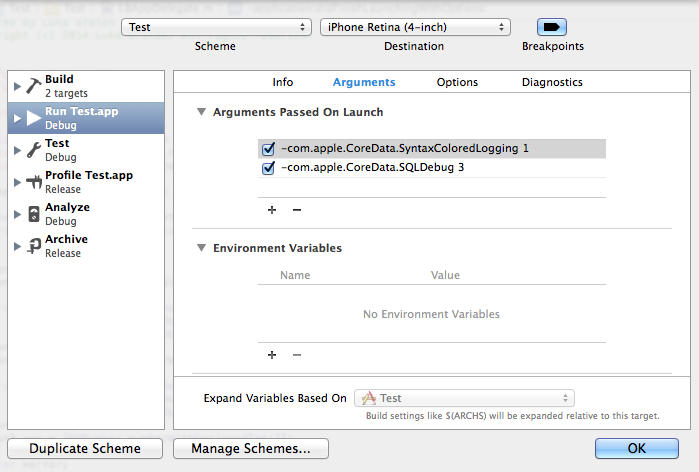
<p>To enable launch arguments for your app select your target from the Xcode toolbar and select <code class="language-plaintext highlighter-rouge">Edit Scheme</code>.
You’ll see this menu:</p>
<p style="text-align: center;"><img src="/images/2014-8-24-EditScheme.png" alt="Edit Scheme" /></p>
<p>Any argument passed on launch will override the current value in <code class="language-plaintext highlighter-rouge">NSUserDefaults</code> for the duration of execution.<sup id="fnref:1" role="doc-noteref"><a href="#fn:1" class="footnote" rel="footnote">1</a></sup>
Here are some options if you’re using SQLite as your persistent store:</p>

<h3 id="-comapplecoredatasqldebug-123">-com.apple.CoreData.SQLDebug [1,2,3]</h3>

<p>This option allows you too see actual SQL statements sent to the persistent store used by Core Data.
Verbosity of the output can be controlled by setting the value from 1 to 3. Higher the number more SQL output you’ll see.</p>

<h3 id="-comapplecoredatasyntaxcoloredlogging-1">-com.apple.CoreData.SyntaxColoredLogging 1</h3>

<p>With this option you can turn on the syntax coloring.</p>

<h3 id="-comapplecoredatasqlitedebugsynchronous-012">-com.apple.CoreData.SQLiteDebugSynchronous [0,1,2]</h3>

<p>Control the way in which data in a SQLite-based store is written to disk. With 0 disk switching is switched off. 1 means normal and 2 is the default.</p>

<h3 id="-comapplecoredatasqliteintegritycheck-1">-com.apple.CoreData.SQLiteIntegrityCheck 1</h3>

<p>With this option SQLite store does extra integrity checking if set to 1.</p>

<h3 id="-comapplecoredatathreadingdebug-123">-com.apple.CoreData.ThreadingDebug [1,2,3]</h3>

<p>This option enables assertions to enforce Core Data’s multi-threading policy. Higher value enables more debugging.</p>

<h2 id="sqlite">SQLite</h2>

<p>There are many tools available for viewing actual SQLite that is stored in application’s Documents directory.
In the simulator <code class="language-plaintext highlighter-rouge">.sqlite</code> is located at:
<code class="language-plaintext highlighter-rouge">~/Library/Application Support/iPhone Simulator/X/Applications/XXXX-XXXX-XXXX-XXXX/Documents</code> where <code class="language-plaintext highlighter-rouge">X</code> is your deployment target.</p>

<p>To simplify the process you can download app called <a href="http://simpholders.com/">SimPholders</a>. It is a small utility for fast access to your iPhone Simulator apps. Or you can use awesome debugging toolkit called <a href="https://github.com/square/PonyDebugger#core-data-browser">PonyDebugger</a>.</p>

<div class="footnotes" role="doc-endnotes">
  <ol>
    <li id="fn:1" role="doc-endnote">
      <p><a href="http://nshipster.com/launch-arguments-and-environment-variables/">Mattt Thompson - Launch Arguments &amp; Environment Variables</a> <a href="#fnref:1" class="reversefootnote" role="doc-backlink">&#8617;</a></p>
    </li>
  </ol>
</div>]]></content><author><name></name></author><summary type="html"><![CDATA[This blog post is just a short overview of the tools that I am using when working with Core Data.]]></summary></entry><entry><title type="html">Generate your Podfile</title><link href="/2014/05/06/generate-your-podfile/" rel="alternate" type="text/html" title="Generate your Podfile" /><published>2014-05-06T11:54:40+00:00</published><updated>2014-05-06T11:54:40+00:00</updated><id>/2014/05/06/generate-your-podfile</id><content type="html" xml:base="/2014/05/06/generate-your-podfile/"><![CDATA[<p>On March, 29th I attended a <a href="http://blog.cocoapods.org/CocoaPods-Bug-Bash/">CocoaPods Bug Bash</a> event. The main idea was to clean up any issues and remove duplicates in the <a href="https://github.com/CocoaPods/CocoaPods">CocoaPods repository</a>.</p>

<h2 id="creativity-curiosity-execution">Creativity, curiosity, execution.</h2>

<p>After the Hackathon finished I said to myself, wouldn’t it be great if you could generate a <a href="http://guides.cocoapods.org/syntax/podfile.html">Podfile</a> with all your favourite third party libraries when you’re starting a new project. It would be similar to services like <a href="https://ninite.com">Ninite</a> for bulk downloading multiple applications.</p>

<p>Because there is the <a href="http://blog.cocoapods.org/Search-API-Version-1/">CocoaPods search API</a> and it was about time to say hello again to Ruby I started working on it.</p>

<p>I <a href="https://github.com/CocoaPods/CocoaPods/issues/1971">asked</a> CocoaPods contributors what they thought about the idea, which served as a brief validation for me.</p>

<h2 id="from-mockup-to-actual-product">From mockup to actual product</h2>

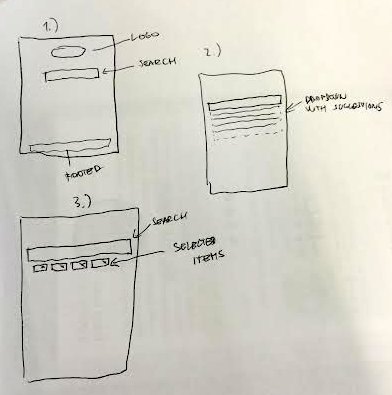
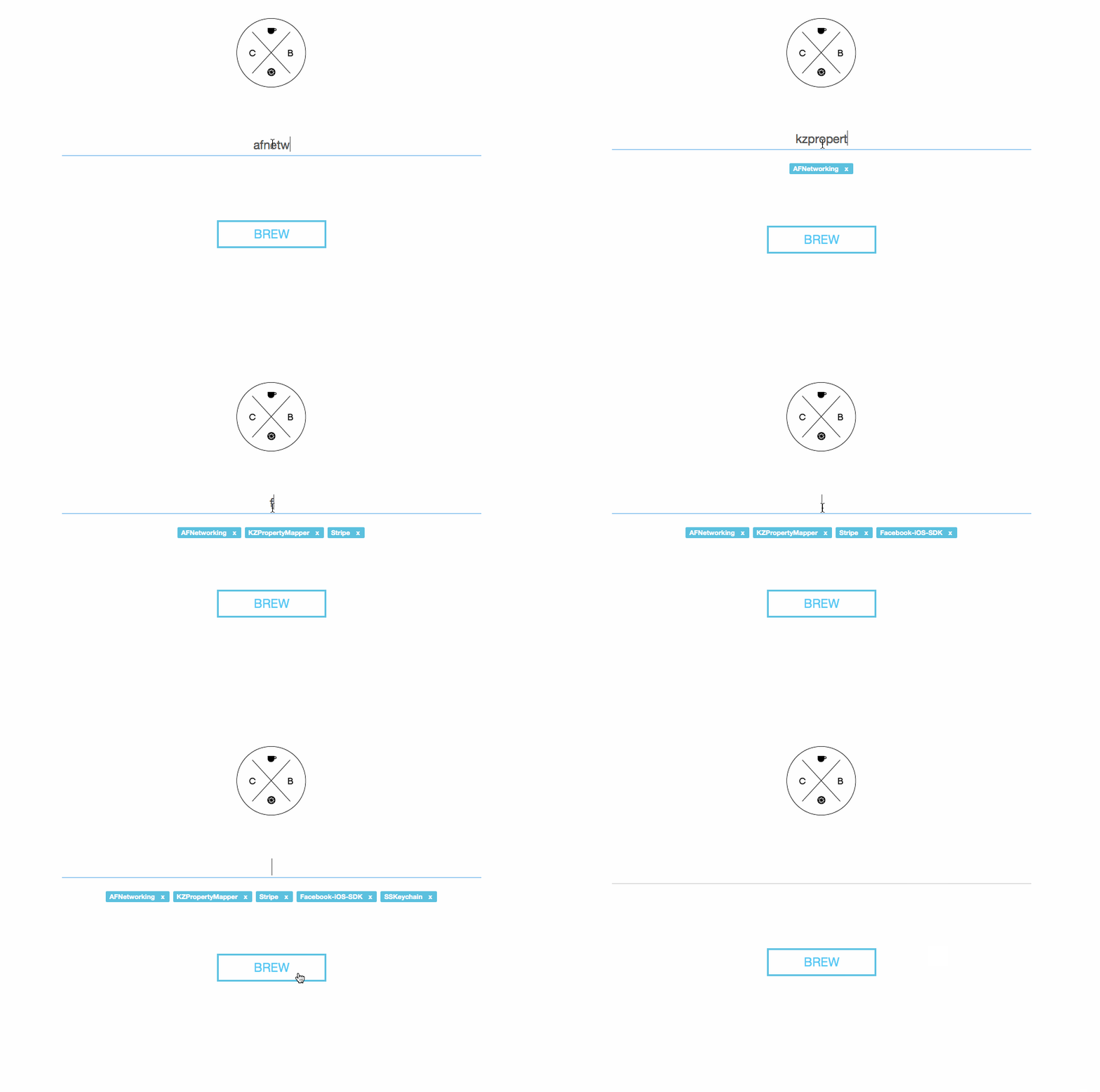
<p>I wanted a pretty simple workflow: search for libraries that you need to start working on your project. A dropdown with suggested libraries will appear. Select library. Repeat. The tags will appear bellow the search bar so that you know which libraries have been selected.
Final step is one click away. It will generate and download a <code class="language-plaintext highlighter-rouge">Podfile</code> with your pods so you just need to <code class="language-plaintext highlighter-rouge">pod install</code> them!</p>

<p style="text-align: center;"><img src="/images/2014-6-5-Mockup.png" alt="Mockup" /></p>

<p>Because I like nice and simple products, I asked <a href="https://twitter.com/primozskerget">Primoz</a> if he could help me with design and logo.</p>

<p><strong>He did the magic.</strong></p>

<p style="text-align: center;"><img src="/images/2014-6-5-Logo1.png" alt="Cocoa Brewer Logo" /></p>

<h2 id="cocoa-brewer">Cocoa Brewer</h2>

<p style="text-align: center;"><img src="/images/2014-6-5-CocoaBrewer.gif" alt="Cocoa Brewer" /></p>

<h2 id="before-you-go">Before you go</h2>

<p>There’s a ton of things that can be improved. Feel free to <a href="https://github.com/CocoaBrewer/cocoabrewer.org">contribute</a>.</p>]]></content><author><name></name></author><summary type="html"><![CDATA[On March, 29th I attended a CocoaPods Bug Bash event. The main idea was to clean up any issues and remove duplicates in the CocoaPods repository.]]></summary></entry><entry><title type="html">debugDescription</title><link href="/2014/03/25/debugdescription/" rel="alternate" type="text/html" title="debugDescription" /><published>2014-03-25T20:03:38+00:00</published><updated>2014-03-25T20:03:38+00:00</updated><id>/2014/03/25/debugdescription</id><content type="html" xml:base="/2014/03/25/debugdescription/"><![CDATA[<p>When I was preparing my talk about remote debugging toolset <a href="https://github.com/square/PonyDebugger">PonyDebugger</a> at <a href="http://www.meetup.com/NSLondon/">NSLondon</a> I had a pre-presentation in front of my lovely co-workers. I was talking a lot about debugging and how to be efficient when doing this. After finished the talk I was asked many questions but this stood out…</p>

<blockquote>
  <p>Luka, why don’t you write code without bugs?</p>

  <p>@Isabel_Glover https://twitter.com/Isabel_Glover</p>
</blockquote>

<p>Good question, but that’s just how it is. We are all humans after all and we make mistakes sometimes. Or maybe the third party libraries we use are not polished enough and specific methods do not function properly so you need to debug.</p>

<h2 id="just-a-random-model">Just a random model</h2>

<p>So with an abundance of models in your project imagine that you have a model for <code class="language-plaintext highlighter-rouge">Person</code></p>

<div class="language-objc highlighter-rouge"><div class="highlight"><pre class="highlight"><code><span class="k">@interface</span> <span class="nc">LBPerson</span> <span class="p">:</span> <span class="nc">NSObject</span>

<span class="k">@property</span> <span class="n">NSString</span> <span class="o">*</span><span class="n">name</span><span class="p">;</span>
<span class="k">@property</span> <span class="n">NSString</span> <span class="o">*</span><span class="n">surname</span><span class="p">;</span>
<span class="k">@property</span> <span class="n">NSUInteger</span> <span class="n">age</span><span class="p">;</span>
<span class="k">@property</span> <span class="n">NSString</span> <span class="o">*</span><span class="n">city</span><span class="p">;</span>

<span class="k">-</span> <span class="p">(</span><span class="n">id</span><span class="p">)</span><span class="nf">initWithName</span><span class="p">:(</span><span class="n">NSString</span> <span class="o">*</span><span class="p">)</span><span class="nv">name</span> <span class="nf">Surname</span><span class="p">:(</span><span class="n">NSString</span> <span class="o">*</span><span class="p">)</span><span class="nv">surname</span> <span class="nf">Age</span><span class="p">:(</span><span class="n">NSUInteger</span><span class="p">)</span><span class="nv">age</span> <span class="nf">City</span><span class="p">:(</span><span class="n">NSString</span> <span class="o">*</span><span class="p">)</span><span class="nv">city</span><span class="p">;</span>

<span class="k">@end</span>
</code></pre></div></div>

<p>You are fiddling around, debugging and inspecting the values that are held inside a newly created object.</p>

<div class="language-objc highlighter-rouge"><div class="highlight"><pre class="highlight"><code><span class="n">LBPerson</span> <span class="o">*</span><span class="n">luka</span> <span class="o">=</span> <span class="p">[[</span><span class="n">LBPerson</span> <span class="nf">alloc</span><span class="p">]</span> <span class="nf">initWithName</span><span class="p">:</span><span class="s">@"Luka"</span> <span class="nf">Surname</span><span class="p">:</span><span class="s">@"Bratos"</span> <span class="n">Age</span><span class="o">:</span><span class="mi">25</span> <span class="n">City</span><span class="o">:</span><span class="s">@"London"</span><span class="p">];</span>
</code></pre></div></div>

<h2 id="lets-debug-yay">Let’s debug, yay</h2>

<p>Let’s do things like this and waste our time:</p>

<div class="language-objc highlighter-rouge"><div class="highlight"><pre class="highlight"><code><span class="n">NSLog</span><span class="p">(</span><span class="s">@"%@"</span><span class="p">,</span> <span class="n">luka</span><span class="p">);</span>
</code></pre></div></div>

<p>Output: <code class="language-plaintext highlighter-rouge">2014-03-25 21:53:28.488 Debug[6752:60b] &lt;LBPerson: 0x8c6a110&gt;</code></p>

<div class="language-objc highlighter-rouge"><div class="highlight"><pre class="highlight"><code><span class="n">NSLog</span><span class="p">(</span><span class="s">@"%@"</span><span class="p">,</span> <span class="n">luka</span><span class="p">.</span><span class="n">name</span><span class="p">);</span>
</code></pre></div></div>

<p>Output: <code class="language-plaintext highlighter-rouge">2014-03-25 21:55:06.740 Debug[6794:60b] Luka</code></p>

<p>This is not very useful. And it takes too much time to write these annoying <code class="language-plaintext highlighter-rouge">NSLog</code>’s.</p>

<h2 id="the-right-way">The right way</h2>

<p>If you take a look and dive into <code class="language-plaintext highlighter-rouge">NSObject</code> header file you will see these two methods:</p>

<div class="language-objc highlighter-rouge"><div class="highlight"><pre class="highlight"><code><span class="k">-</span> <span class="p">(</span><span class="n">NSString</span> <span class="o">*</span><span class="p">)</span><span class="n">description</span><span class="p">;</span>
<span class="k">@optional</span>
<span class="k">-</span> <span class="p">(</span><span class="n">NSString</span> <span class="o">*</span><span class="p">)</span><span class="n">debugDescription</span><span class="p">;</span>
</code></pre></div></div>

<p>In the iOS Developer Library, more specifically in <a href="https://developer.apple.com/library/mac/technotes/tn2124/_index.html#//apple_ref/doc/uid/DTS10003391-CH1-SECCOCOA">Mac OS X Debugging Magic</a> you can see the definition for <code class="language-plaintext highlighter-rouge">description</code> is:</p>

<blockquote>
  <p>All Cocoa objects (everything derived from NSObject) support a description method that returns an NSString describing the object.</p>
</blockquote>

<p>But in most cases the default description is not enough. You can still get some information out but it can be done better.</p>

<h2 id="debugdescription">debugDescription</h2>

<p>You can take advantage of <code class="language-plaintext highlighter-rouge">GBD</code> or <code class="language-plaintext highlighter-rouge">lldb</code> debugger and use <code class="language-plaintext highlighter-rouge">print-object</code> or <code class="language-plaintext highlighter-rouge">po</code>.
By default <code class="language-plaintext highlighter-rouge">po</code> will basically call the <code class="language-plaintext highlighter-rouge">debugDescription</code> method which by default invokes <code class="language-plaintext highlighter-rouge">description</code> method of the specified object.</p>

<p>You can decouple these by implementing <code class="language-plaintext highlighter-rouge">debugDescription</code> on your own.</p>

<div class="language-objc highlighter-rouge"><div class="highlight"><pre class="highlight"><code><span class="k">-</span> <span class="p">(</span><span class="n">NSString</span> <span class="o">*</span><span class="p">)</span><span class="n">debugDescription</span>
<span class="p">{</span>
  <span class="k">return</span> <span class="p">[</span><span class="n">NSString</span> <span class="nf">stringWithFormat</span><span class="p">:</span><span class="s">@"Name: %@</span><span class="se">\n</span><span class="s">Surname: %@</span><span class="se">\n</span><span class="s">Age: %d</span><span class="se">\n</span><span class="s">City: %@</span><span class="se">\n</span><span class="s">"</span><span class="p">,</span> <span class="n">self</span><span class="p">.</span><span class="n">name</span><span class="p">,</span> <span class="n">self</span><span class="p">.</span><span class="n">surname</span><span class="p">,</span> <span class="n">self</span><span class="p">.</span><span class="n">age</span><span class="p">,</span> <span class="n">self</span><span class="p">.</span><span class="n">city</span><span class="p">];</span>
<span class="p">}</span>
</code></pre></div></div>

<h2 id="end-result">End result</h2>

<p style="text-align: center;"><img src="/images/2014-03-25-Po.png" alt="Debug Console" /></p>]]></content><author><name></name></author><summary type="html"><![CDATA[When I was preparing my talk about remote debugging toolset PonyDebugger at NSLondon I had a pre-presentation in front of my lovely co-workers. I was talking a lot about debugging and how to be efficient when doing this. After finished the talk I was asked many questions but this stood out…]]></summary></entry><entry><title type="html">Share code snippets with ease</title><link href="/2014/02/04/share-snippets-of-code-with-ease/" rel="alternate" type="text/html" title="Share code snippets with ease" /><published>2014-02-04T11:19:06+00:00</published><updated>2014-02-04T11:19:06+00:00</updated><id>/2014/02/04/share-snippets-of-code-with-ease</id><content type="html" xml:base="/2014/02/04/share-snippets-of-code-with-ease/"><![CDATA[<p><strong>Update - Snippet was rewritten in Python! See <a href="https://github.com/lukabratos/Snippet/issues/2">this</a></strong>.</p>

<p><a href="https://help.github.com/articles/creating-gists">GitHub Gist</a> is a nice way to share a snippet of code or a block of text with other people. Gists are under Git revision control so it is very easy to view and follow changes, other users can fork them and they are under SSL encryption for private sharing.</p>

<h2 id="overview">Overview</h2>

<p>Snippet is a Mac OS X Service made with Automator and powered by a small Ruby script for uploading code snippets to GitHub Gist with the ease of a simple right-click.</p>

<h2 id="implementation">Implementation</h2>

<p>Implementation was pretty straightforward. Gists can be created for anonymous users without a token.
Code bellow will create private Gist named <code class="language-plaintext highlighter-rouge">file1.txt</code> with content <code class="language-plaintext highlighter-rouge">Hello World!</code>.
We can optionally add a description and set visibility of Gist to public or private. The default is private.</p>

<div class="language-ruby highlighter-rouge"><div class="highlight"><pre class="highlight"><code><span class="n">curl</span> <span class="o">-</span><span class="no">X</span> <span class="no">POST</span> <span class="p">\</span>
<span class="o">--</span><span class="n">data</span><span class="o">-</span><span class="n">binary</span> <span class="s1">'{"files": {"text.txt": {"content": "Hello World!"}}}'</span> <span class="p">\</span>
<span class="n">https</span><span class="ss">:/</span><span class="o">/</span><span class="n">api</span><span class="p">.</span><span class="nf">github</span><span class="p">.</span><span class="nf">com</span><span class="o">/</span><span class="n">gists</span>
</code></pre></div></div>

<p>I used Automator workflow with Shell Script and Ruby to achieve my goal with the help of a simple Ruby script that will take selected text, create an API call and parse the URL value returned by the GitHub API and copy it to the clipboard.</p>

<div class="language-ruby highlighter-rouge"><div class="highlight"><pre class="highlight"><code><span class="nb">require</span> <span class="s1">'json'</span>
<span class="nb">require</span> <span class="s1">'net/http'</span>

<span class="n">uri</span> <span class="o">=</span> <span class="no">URI</span><span class="p">(</span><span class="s2">"https://api.github.com/gists"</span><span class="p">)</span>
<span class="n">data</span> <span class="o">=</span> <span class="p">{</span> <span class="s1">'files'</span> <span class="o">=&gt;</span> <span class="p">{</span> <span class="s1">'snippet'</span> <span class="o">=&gt;</span> <span class="p">{</span> <span class="s1">'content'</span> <span class="o">=&gt;</span> <span class="no">ARGV</span><span class="p">[</span><span class="mi">0</span><span class="p">]</span> <span class="p">}}}</span>

<span class="n">request</span> <span class="o">=</span> <span class="no">Net</span><span class="o">::</span><span class="no">HTTP</span><span class="o">::</span><span class="no">Post</span><span class="p">.</span><span class="nf">new</span><span class="p">(</span><span class="n">uri</span><span class="p">.</span><span class="nf">path</span><span class="p">)</span>
<span class="n">request</span><span class="p">.</span><span class="nf">body</span> <span class="o">=</span> <span class="n">data</span><span class="p">.</span><span class="nf">to_json</span>

<span class="n">response</span> <span class="o">=</span> <span class="no">Net</span><span class="o">::</span><span class="no">HTTP</span><span class="p">.</span><span class="nf">start</span><span class="p">(</span><span class="n">uri</span><span class="p">.</span><span class="nf">hostname</span><span class="p">,</span> <span class="n">uri</span><span class="p">.</span><span class="nf">port</span><span class="p">,</span> <span class="ss">:use_ssl</span> <span class="o">=&gt;</span> <span class="kp">true</span><span class="p">)</span> <span class="k">do</span> <span class="o">|</span><span class="n">http</span><span class="o">|</span>
  <span class="n">http</span><span class="p">.</span><span class="nf">request</span><span class="p">(</span><span class="n">request</span><span class="p">)</span>
<span class="k">end</span>

<span class="n">my_hash</span> <span class="o">=</span> <span class="no">JSON</span><span class="p">.</span><span class="nf">parse</span><span class="p">(</span><span class="n">response</span><span class="p">.</span><span class="nf">body</span><span class="p">)</span>
<span class="no">IO</span><span class="p">.</span><span class="nf">popen</span><span class="p">(</span><span class="s1">'pbcopy'</span><span class="p">,</span> <span class="s1">'w'</span><span class="p">)</span> <span class="p">{</span> <span class="o">|</span><span class="n">f</span><span class="o">|</span> <span class="n">f</span> <span class="o">&lt;&lt;</span> <span class="n">my_hash</span><span class="p">[</span><span class="s2">"html_url"</span><span class="p">]</span> <span class="p">}</span>
</code></pre></div></div>

<h2 id="installation">Installation</h2>

<p>Double-click on <code class="language-plaintext highlighter-rouge">Snippet.workflow</code> and click on the <code class="language-plaintext highlighter-rouge">Install</code> button.
This will install Snippet into <code class="language-plaintext highlighter-rouge">~/Library/Services</code> folder.</p>

<p>You can uninstall by deleting it from the same folder.</p>

<p>If you want to assign a keyboard shortcut to Snippet service you can do this easily by assigning a key in <code class="language-plaintext highlighter-rouge">System Preferences -&gt; Keyboard -&gt; Shortcuts -&gt; Services</code>.</p>

<h2 id="usage">Usage</h2>

<p>Select code and right-click. <code class="language-plaintext highlighter-rouge">Snippet</code> is located under <code class="language-plaintext highlighter-rouge">Services</code> menu.
When you use it, it will automatically upload selected text to GitHub Gist and it will copy generated URL to your clipboard so you can share instantly.</p>

<h2 id="requirenments">Requirenments</h2>

<p><code class="language-plaintext highlighter-rouge">Ruby 1.9.2+</code> or <code class="language-plaintext highlighter-rouge">gem install json</code>.</p>

<p>You can download the project <a href="https://github.com/lukabratos/Snippet">here</a>.</p>]]></content><author><name></name></author><summary type="html"><![CDATA[Update - Snippet was rewritten in Python! See this.]]></summary></entry><entry><title type="html">A/B testing iOS apps like a pro</title><link href="/2014/01/14/a-slash-b-testing-ios-apps-like-a-pro/" rel="alternate" type="text/html" title="A/B testing iOS apps like a pro" /><published>2014-01-14T14:48:54+00:00</published><updated>2014-01-14T14:48:54+00:00</updated><id>/2014/01/14/a-slash-b-testing-ios-apps-like-a-pro</id><content type="html" xml:base="/2014/01/14/a-slash-b-testing-ios-apps-like-a-pro/"><![CDATA[<p><a href="http://en.wikipedia.org/wiki/A/B_testing">A/B testing</a> is commonly used in several forms of advertising predominantly in online marketing and web development.
It is often called split-testing because sample of users is usually split in two halves or variants <strong>A</strong> and <strong>B</strong>.</p>

<p>Variants <strong>A</strong> (baseline) and <strong>B</strong> are compared which differ one from another in small aspect that might impact user’s behaviour.
Point of A/B testing is finding the predominant version that will result in higher <a href="http://en.wikipedia.org/wiki/Conversion_marketing">conversion rates</a>.</p>

<h2 id="say-hello-to-bestly">Say hello to Bestly</h2>

<p><a href="http://best.ly">Bestly</a> offers an easy way to add A/B testing and staged rollouts to native mobile applications.</p>

<p>The easiest way to add Bestly into your iOS project is using <a href="http://cocoapods.org">CocoaPods</a>.
Simply create new <strong>Podfile</strong> or add to existing one <code class="language-plaintext highlighter-rouge">pod 'Bestly'</code> and run <code class="language-plaintext highlighter-rouge">pod install</code> in your terminal.</p>

<p>Then you need to add the following import to your <code class="language-plaintext highlighter-rouge">.pch</code> or <code class="language-plaintext highlighter-rouge">AppDelegate.m</code></p>

<div class="language-objc highlighter-rouge"><div class="highlight"><pre class="highlight"><code><span class="cp">#import &lt;Bestly/Bestly.h&gt;
</span></code></pre></div></div>

<p>Sign into <a href="http://best.ly">Bestly</a> and create a new app. Paste the following line to your <code class="language-plaintext highlighter-rouge">application:didFinishLaunchingWithOptions:</code> and replace <code class="language-plaintext highlighter-rouge">APP_KEY</code> with key that was generated on the website.</p>

<div class="language-objc highlighter-rouge"><div class="highlight"><pre class="highlight"><code><span class="p">[</span><span class="n">Bestly</span> <span class="nf">setupWithKey</span><span class="p">:</span><span class="s">@"APP_KEY"</span><span class="p">];</span>
</code></pre></div></div>

<h2 id="creating-your-first-controlled-experiment">Creating your first controlled experiment</h2>

<p>You can run experiment with <strong>two</strong> <em>A, B</em> or <strong>three</strong> <em>A, B, C</em> variants.</p>

<p>In this example I will show you the basic usage with two variants.</p>

<div class="language-objc highlighter-rouge"><div class="highlight"><pre class="highlight"><code><span class="cm">/**
 * Call this whenever you'd like to run an experiment.
 * @param experimentID The experiment ID corresposding to the
 * experiment that you'd like to run.
 * @param a Experiment variation A. This is the baseline
 * variation. Please note that in any sort of failure
 * (e.g. lack of internet connectivity),
 * this will be the variation that is run.
 * @param b Experiment variation B.
 */</span>
<span class="k">+</span> <span class="p">(</span><span class="kt">void</span><span class="p">)</span><span class="nf">runExperimentWithID</span><span class="p">:(</span><span class="n">NSString</span> <span class="o">*</span><span class="p">)</span><span class="nv">experimentID</span>
                          <span class="nf">A</span><span class="p">:(</span><span class="kt">void</span><span class="p">(</span><span class="o">^</span><span class="p">)(</span><span class="kt">void</span><span class="p">))</span><span class="nv">a</span>
                          <span class="nf">B</span><span class="p">:(</span><span class="kt">void</span><span class="p">(</span><span class="o">^</span><span class="p">)(</span><span class="kt">void</span><span class="p">))</span><span class="nv">b</span><span class="p">;</span>
</code></pre></div></div>

<p>Let’s say that we want to A/B test a button with different title. We’ve got two variants:</p>

<ul>
  <li><strong>A</strong>: Hi!</li>
  <li><strong>B</strong>: Hello!</li>
</ul>

<p>Paste this code and replace <code class="language-plaintext highlighter-rouge">EXPERIMENT_ID</code> with <em>Experiment ID</em> that you can find on the website.</p>

<div class="language-objc highlighter-rouge"><div class="highlight"><pre class="highlight"><code><span class="p">[</span><span class="n">Bestly</span> <span class="nf">runExperimentWithID</span><span class="p">:</span><span class="s">@"EXPERIMENT_ID"</span> <span class="nf">A</span><span class="p">:</span><span class="o">^</span><span class="p">{</span>
    <span class="c1">// Insert your testing logic here...</span>
    <span class="p">[</span><span class="n">self</span><span class="p">.</span><span class="n">testButton</span> <span class="nf">setTitle</span><span class="p">:</span><span class="s">@"Hi!"</span> <span class="nf">forState</span><span class="p">:</span><span class="n">UIControlStateNormal</span><span class="p">];</span>
<span class="p">}</span> <span class="n">B</span><span class="o">:^</span><span class="p">{</span>
    <span class="p">[</span><span class="n">self</span><span class="p">.</span><span class="n">testButton</span> <span class="nf">setTitle</span><span class="p">:</span><span class="s">@"Hello!"</span> <span class="nf">forState</span><span class="p">:</span><span class="n">UIControlStateNormal</span><span class="p">];</span>
<span class="p">}];</span>
</code></pre></div></div>

<p>Place the following code to the <code class="language-plaintext highlighter-rouge">UIButton</code> action method so you can see if variation’s goal was reached.</p>

<div class="language-objc highlighter-rouge"><div class="highlight"><pre class="highlight"><code><span class="k">-</span> <span class="p">(</span><span class="n">IBAction</span><span class="p">)</span><span class="nf">testButtonTapped</span><span class="p">:(</span><span class="n">id</span><span class="p">)</span><span class="nv">sender</span> <span class="p">{</span>
    <span class="p">[</span><span class="n">Bestly</span> <span class="nf">goalReachedForExperimentID</span><span class="p">:</span><span class="s">@"EXPERIMENT_ID"</span><span class="p">];</span>
<span class="p">}</span>
</code></pre></div></div>

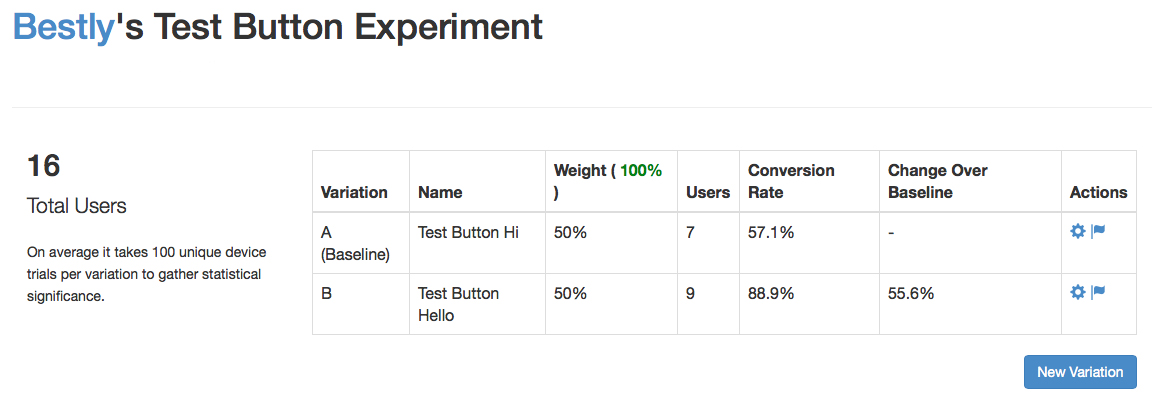
<p>After playing around a little bit on the iPhone simulator we can see that the conversion rate is higher for the button with the title <strong>Hello</strong>. However to get accurate results, the number of users needs to be bigger than 100 per variation.</p>

<p style="text-align: center;"><img src="/images/2014-01-14-ExperimentResult.jpg" alt="Experiment" /></p>

<h2 id="conversion-rate-and-change-over-baseline">Conversion rate and change over baseline</h2>

<p>For each variation conversion rate is calculated as:</p>

<p style="text-align: center;"><img src="https://latex.codecogs.com/gif.latex?p&space;=&space;\frac{x}{n}" alt="Conversion Rate" /></p>

<p>Where <strong>x</strong> is number of conversions and <strong>n</strong> is number of people that have viewed variation.</p>

<p>Formula for calculating change over baseline is basically substraction of conversion <strong>B</strong> and <strong>A</strong> divided by conversion value of <strong>A</strong>.</p>

<p style="text-align: center;"><img src="https://latex.codecogs.com/gif.latex?c&space;=&space;\frac{p_{b}-p_{a}}{p_{a}}" alt="Change Over Baseline" /></p>

<h2 id="update">Update</h2>

<p>The response for this blog post was immense. I was lucky enough to get on the the front page of <a href="https://news.ycombinator.com/item?id=7063595">Hacker News</a> resulting in almost 3000+ visitors from 70+ countries in one day—not too bad.</p>

<p>I also received a very special email. It was from James, the founder of Bestly. He thanked me for writing the post and informed me that a new version of Bestly is coming out.</p>

<h2 id="what-changed">What changed</h2>

<ol>
  <li>There’s a new version of Bestly SDK on <a href="https://github.com/bestly/bestly-ios">GitHub</a></li>
  <li>You don’t need to use <code class="language-plaintext highlighter-rouge">[Bestly goalReachedForExperimentID:@""];</code> anymore<sup id="fnref:1" role="doc-noteref"><a href="#fn:1" class="footnote" rel="footnote">1</a></sup>.</li>
  <li>Design changes on the dashboard</li>
  <li>Other things such as aliases</li>
</ol>

<p>You can download the project <a href="https://github.com/lukabratos/Bestly">here</a>.</p>

<div class="footnotes" role="doc-endnotes">
  <ol>
    <li id="fn:1" role="doc-endnote">
      <p>You can send any event you want to track and it wil be tracked for every experiment. <a href="#fnref:1" class="reversefootnote" role="doc-backlink">&#8617;</a></p>
    </li>
  </ol>
</div>]]></content><author><name></name></author><summary type="html"><![CDATA[A/B testing is commonly used in several forms of advertising predominantly in online marketing and web development. It is often called split-testing because sample of users is usually split in two halves or variants A and B.]]></summary></entry></feed>